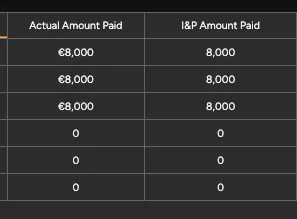
Ever wondered how you can add units to Subitem Formulas without it being considered a character?
With Number columns, you can set units to keep track of what the Numbers column is measuring. With item Formulas, you need to set the unit at the board or group footer. However, with subitems, there are no group or board footer. Additionally, you don't want to set the unit within the formula as it is then considered a character. This will disrupt the algorithms and refuse to add or subtract when utilizing charts.
So, what are you supposed to do?
Create a formula on the item level.
Set it with the correct unit on the board/group footer.
Go to your subitem level and add a new column by selecting "Copy parent columns."
Select your formula column.
Change your new formula column to your needed formula.
See my picture below. Right formula is without copying whereas left formula is with copying from parent.
Enjoy!