There needs to be a way to add / edit / manage columns in a vertical view as an alternative to horizontal view of the board’s grid. When adding a large number of columns, it becomes completely unmanageable to have to scroll huge amounts horizontally, and it’s easy to lose track of what columns you have / don’t have, and rearranging them is a total mess and can take a significant amount of time. Having a list view would resolve a lot of this and is very simple.
I agree! It would be a huge help to have a vertical list to rearrange columns. It’s frustrating to try and rearrange them horizontally by dragging and scrolling, especially on some of the bigger boards that have 40+ columns.
Hey @User129438 - I should add that you can rearrange the columns using the “hide” or “hidden columns” dropdown. It’s not the best, especially if you have a lot of columns because the drag speeds up and it’s easy to miss the drop, but it’s better than nothing right now.
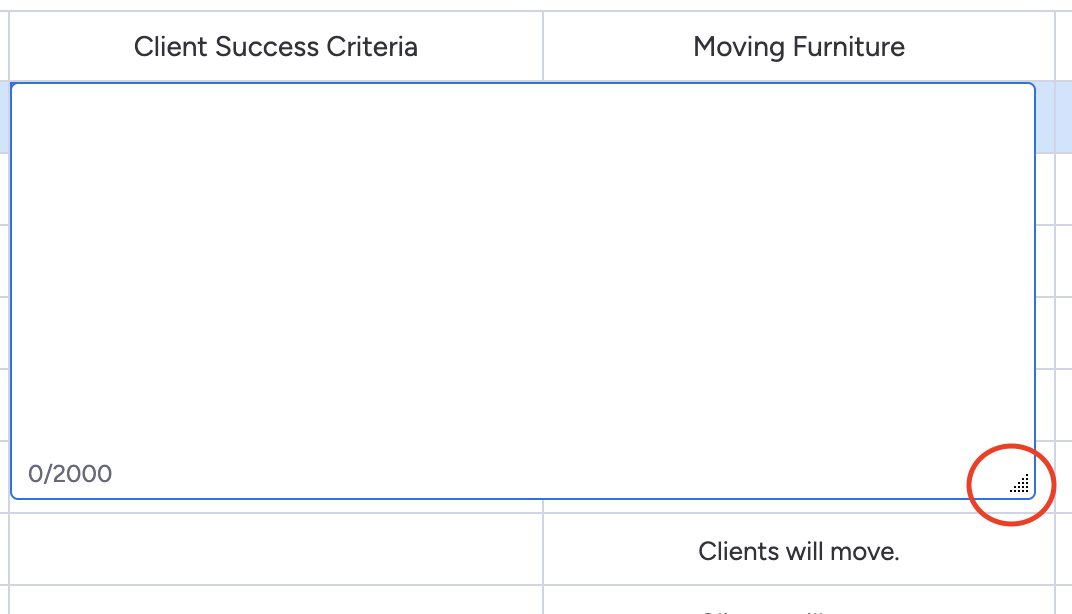
@MondayIT it would be nice to be able to expand the “hide” / “hidden columns” drop down box (similar to how you can expand the “long text” column item. I attached a screenshot circling the expand feature that I’m talking about:
1 Like
@kirst Insane that Monday staff doesn’t even know about that, thank you for sharing your find, that is indeed at least a somewhat solution. Agreed about the drag speed, it needs to just be a full screen vertical list, but this is better than nothing as you said. Thanks!
1 Like
Have you utilized board views yet? Board views enable you to visualize your board’s information in various ways, making it easier to analyze and report on your data. I recommend using the Kanban View for this purpose. Here’s a quick 4-minute read on how to add a Kanban View to your board: https://support.monday.com/hc/en-us/articles/360000661379-The-Kanban-View
Respectfully, not at all what we are discussing
Although the kanban view allows you to view the column data in a vertical list, it still doesn’t allow you to rearrange the order of the columns.
Hi @User129438 , For me personally, this was a big UI change to overcome after flipping from another platform.
Here’s what helped me:
Create an item card (you can rename it to Summary or whatever). You can then display and group the columns in different ways.

Thanks for the efforts. The item card is actually one of the primary reasons that the feature I requested is needed - the item card displays the columns in order of what they are in your main table horizontal view. So the only way to re-order those is to physically drag them in the main table view, which is where this issue comes into play. I have around 200 columns, it is extremely difficult to view them and manage them and rearrange them having to scroll left to right. My original feature request is still needed and is an extremely basic lacking functionality
2 Likes
This feature request is a must.
LOVE THIS! It would be a game changer.
1 Like
I’d also LOVE to see the ability to collapse columns. For example, let’s imagine you want to track 10 fields. However, some of the fields are more informational and do not need to be in the default view at all times. Perhaps having the ability to select primary columns that load automatically and secondary columns that are stored in an expandable area of grids. This would be a GAME CHANGER. Right now, it’s so tough to scroll through the column items especially for subitems.
It’s astounding to me something as rudimentary and useful as this even needs requesting. Currently it’s unnecessarily difficult managing (setting up, editing, and reorganising) board columns on boards with a large number of columns.
Agree. This could neatly be added to the existing “hide columns” drop down, to have the drop down include ‘hide’ options but also open up the column settings pane (which already exists, why not link them up?)