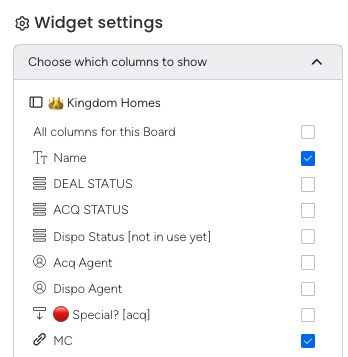
We currently have built workflows based off table widgets on Monday (as each workflow requires different columns, and we’d prefer one singular “terminal” as opposed to having 50 different views for our team). While we can hide the MAIN columns, we cannot hide subitems. A large part of our architecture is based off subitems, and without hiding them, we waste tons of time (and create added confusion for our team) looking for the correct columns. I’ve attached a picture of how you can hide the main items columns, but there is no way to hide the subitems.
Related topics
| Topic | Replies | Views | Activity | |
|---|---|---|---|---|
| Hiding Sub-Item columns as part of a view | 31 | 9454 | August 22, 2024 | |
| Hiding subitem columns in a Table widget on a dashboard | 2 | 49 | May 7, 2025 | |
| Hiding columns - sub items | 2 | 1409 | July 20, 2023 | |
| Hide + Sort Subitem Columns | 45 | 4527 | May 15, 2024 | |
| Option to choose or hide the sub-items column in Table Widget. | 2 | 312 | July 11, 2025 |