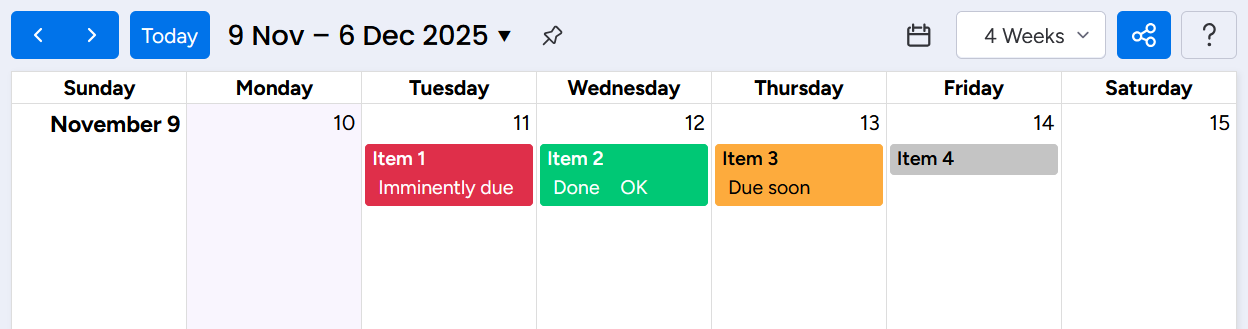
I would like to create a calendar view on a board, that is color coded by the due date.
Currently the chart is color coded by the status of the item.
A_ I would like to have an option to color an item ‘red’ for items with a due date within 0-3 days & status has not been marked as “done/ completed” > and ‘Dark red’ for items with a due date ‘past due’ and has not been marked as “done/ completed”
B_ I would like to have an option to color an item “yellow” when the due date is within 1.5 weeks from the due date (12-4 days before), and has a status that has not yet been marked as “done/ completed”
C_ I would like to have item marked in “Green” when the status has been “completed”
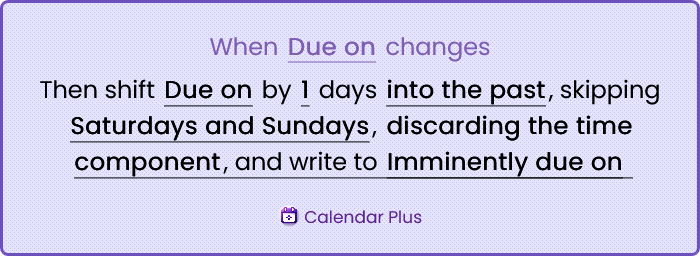
Set up automations to calculate the Due soon on and Imminently due on dates. Adjust as necessary for your situation. I’ve opted for due soon = 3 business days, imminently due = 1 business day.
Calendar Plus offers a calendar replacement, if you’re interested, and Automato is purely focussed on automations and will be cheaper or even free.
2.2. Conditional due date arrivals
When these due dates arrive, unless the task is completed, set the corresponding due status. The condition ensures tasks will not be coloured orange/red when they’re already completed.