Hello- I’ve seen some suggestions but nothing seems to give me the exact way to do this. My Leads board has specific items: Person Name, Company Name, Company website, Person email. When a lead moves to the stage ‘qualify’ I’d like to automatically create the contact , company + deal in an automation. When I tried this the lead details only landed on account or contact, not both and they aren’t tied to each other.
Example:
Contact pulls name + email from leads but not company name until company is created in accounts.
Accounts pulls in Company name + website but not contacts associated with the company from contacts
I would love to take it a step further and create a deal as well but I’m starting with accounts + Contact. The other issue is I have automations to automatically create a status when a new item is created. When the automation from leads to contacts or boards happen, the automation for the new item created update status isn’t working.
I’m not sure what i’m doing wrong. Any specific steps would be helpful!
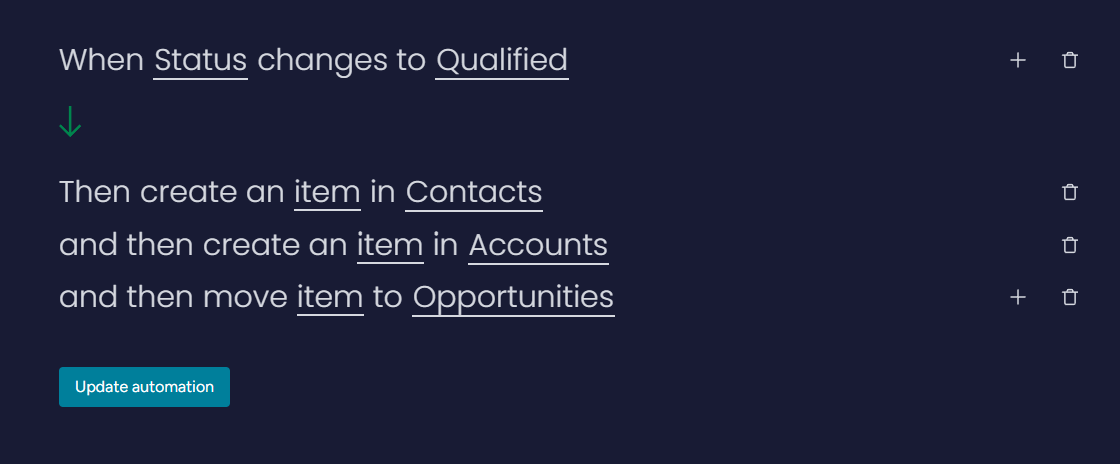
@ShannonTW two schools of that on this. 1 is to keep a qualified lead on the leads board and the other is to move the lead to the deals board. You technically could bring all the lead data over to the deals board but some people don’t want to do that. And you can’t track lead data in a leads board view if the qualified lead is moved off the board but here is one automation setup. Make sure you click on “item” and map the appropriate data. You can also add an automation to match based on a unique identifier.
It sounds like you’ll need to use a multi-step automation that maps both the contact and the company fields at the same time, then links them before creating the deal. Check if your platform supports “create account + contact” as one recipe instead of separate ones that usually keeps them tied together. For the status update issue, make sure the trigger is set to run on items created via automation as well, not just manual entries.